
Instead of manually chasing utility markings before each outdoor construction task, connect your Miss Utility locate request to a written excavation-release checklist. For your 2026 project, tie the request boundary, utility responses, private-line checks, and field verification to the specific work area before anyone breaks ground.
- Miss Utility locate request outdoor construction planning starts with a defined excavation boundary, not just a property address.
- Call 811 before digging; follow the notification rules for the jurisdiction where excavation occurs.
- Aandeconstructionllc provides general contracting; utility owners and their locating representatives handle participating utility markings.
- A submitted locate request is not permission to excavate; review responses, markings, and unresolved conflicts first.
Why this matters
A locate ticket is a construction dependency, not an excavation permit. Patio footings, drainage trenches, fence posts, and underground electrical routes all need the locate process connected to the actual digging scope. An address alone does not describe where that work will happen.
Aandeconstructionllc is best for property owners seeking general contracting for outdoor construction, rather than utility locating alone. The company serves residential, commercial, and government buyers in Washington, DC, Maryland, and Virginia. Discuss the construction scope with Aandeconstructionllc while keeping utility locating, permit approvals, and any required engineering assigned to their responsible parties.
Your 2026 schedule should track those dependencies separately. A permit approval does not establish that underground utilities have been located, and paint on the ground does not authorize the project itself.
Before you start
- Prepare the excavation scope. Gather the site address, a current sketch or plan, access instructions, proposed digging methods, and the areas where excavation will occur. Include footing holes and temporary work that disturbs soil.
- Identify the responsible excavator and local process. Use 811 to reach the appropriate notification service. Washington, DC, Maryland, and Virginia have jurisdiction-specific requirements; confirm notice periods, response procedures, ticket validity, and renewal obligations for your site.
- Separate participating utilities from private lines. Owner-installed irrigation, lighting, detached-building feeds, and other private facilities are not automatically covered by the notification request. Establish who will investigate those facilities before scheduling excavation.
Do not assume the owner's request automatically covers every contractor. Confirm which excavator must hold the ticket under the applicable rules before a subcontractor mobilizes.
Excavation scope
Start with a project worksheet rather than an assumed online integration. The bold labels below are suggested worksheet fields, not claims about buttons or fields in a particular Miss Utility portal.
- Create the work-area record. Enter Site address, Work area, Excavator, and Site contact. Assign 1 responsible excavator to each excavation task so the release decision has a clear owner.
- Draw the digging boundary. Show the proposed trench, footing, post-hole, or grading area on a plan. Include access information and fixed landmarks that help distinguish a rear courtyard from a front planting strip.
- Describe the physical work. Under Excavation scope, explain what will disturb the ground. A drainage installation needs a route description; a fence project needs the post-hole corridor, not simply the words backyard work.
- Check private-facility information. Collect available owner records and identify areas needing private locating or further investigation. Treat old drawings as reference information, not proof of present field conditions.
Expected result: The excavator, owner, and locator can identify the same proposed work area without relying on a verbal explanation from someone who is absent.
Keep the boundary practical. A request that excludes a staging-area anchor or a revised drainage outlet leaves that excavation outside the documented scope. Conversely, an unclear request covering an entire property makes it harder to connect responses to a specific construction task.
Locate request record
Use the notification channel appropriate to the jurisdiction and request type. Do not copy submission instructions from a neighboring state's process.
- Submit the request with the excavator's details. Provide the site location, work description, proposed excavation area, contact information, and other information the notification service requires. Accurately identify the entity performing the excavation.
- Record the ticket information. Save Ticket number, Submission date, Proposed start, and the notification service's instructions. Preserve the ticket confirmation with the matching work-area sketch.
- Record timing requirements. Enter the applicable notice deadline and validity information exactly as supplied or established by the jurisdiction's rules. Do not calculate a start date using a generic business-day assumption.
- Assign response follow-up. Name the person who will check participating utility responses and report missing or conflicting information to the excavator. A reminder can prompt that check; it cannot perform the safety review.
Expected result: Each excavation task has a traceable ticket, a defined boundary, and an accountable person checking its status.
For a 2026 project file, keep the submission confirmation and later updates together. A ticket number copied into a calendar entry is useful, but the underlying scope and response history are what explain its relevance.
Response and field verification
A submitted ticket does not mean every affected facility has been marked. Review the notification service's response information and compare it with conditions at the property.
- Review utility responses. Use the applicable response system to check each notified member's status. Resolve missing responses and follow the prescribed process for incomplete, conflicting, or unclear information.
- Walk the work area. Compare the ticket boundary, visible markings, utility structures, and proposed excavation route. Confirm that gates, parked vehicles, or inaccessible areas did not prevent the requested locating work.
- Resolve private-line questions. Arrange appropriate private locating or further investigation where owner-controlled facilities affect the work. Do not interpret the absence of participating-utility markings as confirmation that no underground facilities exist.
- Document the field review. Save dated photographs, response records, and unresolved questions under Field verification. Photographs document the review; they do not replace required markings, utility responses, or excavation precautions.
Expected result: The excavator has reviewed both the response record and the actual work area, with unanswered questions kept visible rather than treated as completed tasks.
The construction dependency is straightforward: define the scope, request locating, verify responses, and then make the excavation-release decision. A change at an earlier stage sends the task back for review.
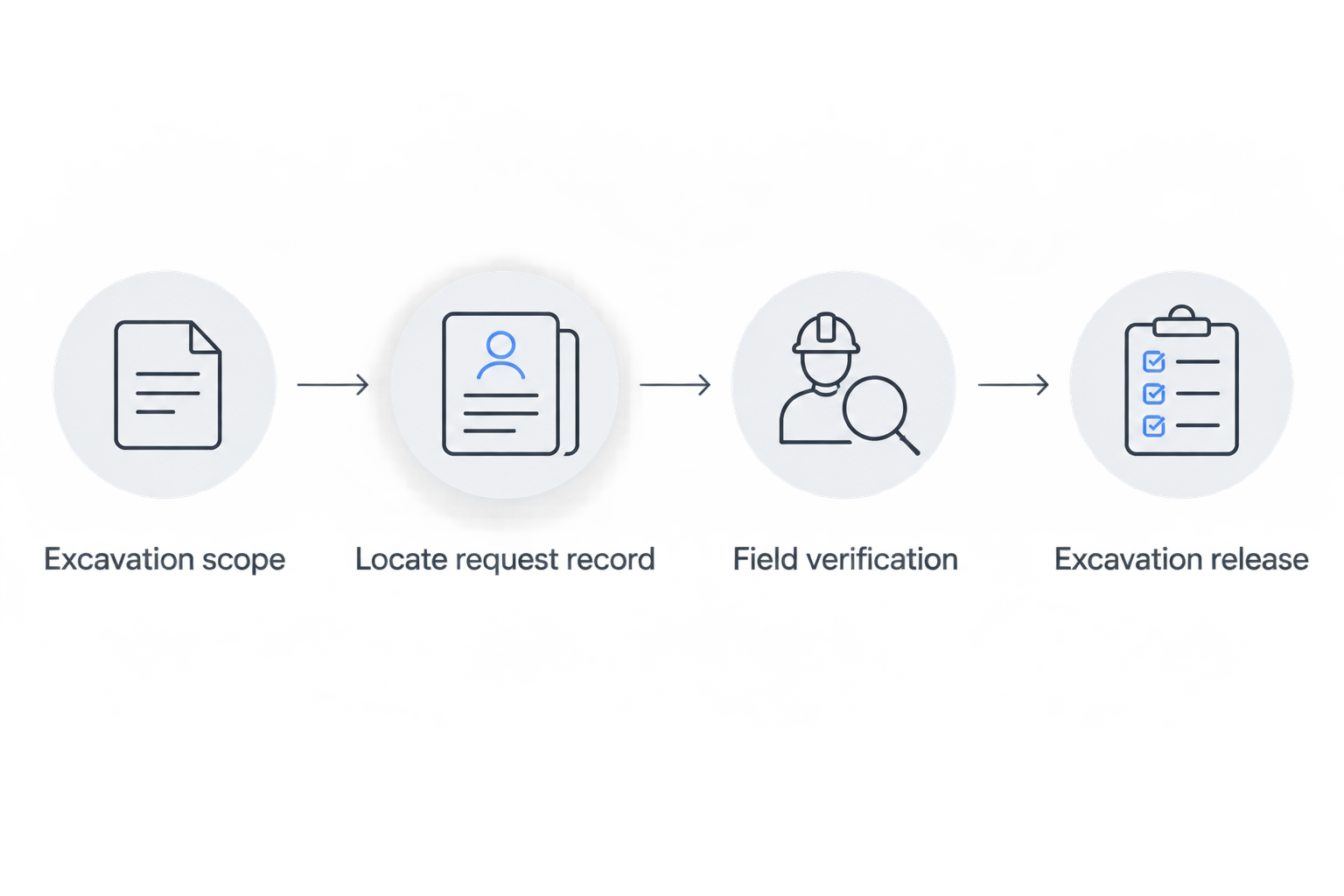
Excavation release
Make the start decision a separate project milestone. Do not let equipment delivery or crew arrival substitute for it.
- Check the release conditions. Confirm that the applicable waiting requirements have been met, responses have been reviewed, necessary markings remain usable, and unresolved facility questions have been addressed through the proper process.
- Brief the excavation crew. Review the current ticket scope, marked facilities, private-line findings, access restrictions, and required excavation precautions. Follow applicable tolerance-zone and safe-excavation requirements; markings do not establish exact depth.
- Record the decision. Enter Release decision, Decision owner, and Review date. Keep the task on hold when a required condition is unresolved. The worksheet records the decision; it does not transfer the excavator's legal responsibilities.
- Check conditions as work continues. Protect markings and reassess the ticket when the route, excavator, timing, or site conditions change. Follow the applicable update or re-mark process before relying on outdated information.
Expected result: Excavation starts only after the responsible party confirms the applicable conditions, and the crew understands when work must stop for another review.
Use 3 separate checks in your 2026 release record: ticket status, field conditions, and crew instructions. Keeping them separate prevents a completed administrative task from hiding an unresolved field problem.
Repeat the workflow when the digging area changes
A drainage outlet moves, a fence line shifts, or an electrical route takes a different path. Treat that change as a scope review, not a minor drawing edit.
Compare the revised boundary with the ticket's documented coverage. Confirm the required update or new-request process with the notification service, address private facilities along the new route, and repeat field verification before releasing the changed work.
| Workflow | Best for | Advantage | Limitation |
|---|---|---|---|
| Initial locate request | A defined excavation area before work begins | Establishes the request and response record for the planned scope | Does not automatically cover later changes |
| Changed-scope review | Relocated, expanded, or rescheduled excavation | Reconnects the ticket process to the actual work | Requires another review and any applicable notification steps |
Neither workflow replaces permits or utility service coordination. Where excavation depends on new electrical service, use the utility coordination and project timeline guide to keep that separate dependency visible.
Troubleshooting
The ticket exists, but a utility response is missing
Keep the affected excavation on hold. Review the response record and follow the notification service's prescribed missing-response process. A scheduled start date does not resolve an unanswered notification.
Markings disappear before the crew arrives
Stop relying on the old marking record and follow the applicable re-mark process. Photos help explain what changed, but they do not recreate usable field markings. Protect replacement markings from traffic and material storage.
The crew finds an unexpected pipe or cable
Stop excavation in the affected area and follow the applicable utility-notification and safety procedures. Do not identify a facility by appearance alone. If damage creates an immediate danger, withdraw to safety and call 911.
The plan and ticket describe different areas
Hold the changed excavation and reconcile the boundaries. Submit the required update or request, then repeat the response and field checks. Do not extend paint lines yourself to make the ticket appear to fit.
The owner expects private facilities to be included
Explain which facilities the notification process covers and assign the remaining investigation. Confirm the private locator's scope and limitations before relying on that work. Keep unresolved private-line questions on the release checklist.
Customize your workflow
For a small outdoor project, a shared worksheet and marked plan can keep the dependencies visible. For occupied commercial or multifamily properties, add tenant access, parking restrictions, delivery routes, and restoration responsibilities. For public-sector sites, connect excavation release to the authorized site representative and project controls.
Aandeconstructionllc general contracting discussions should separate construction responsibilities from utility locating and permit decisions. Ask for a site review with the site address, excavation scope, available plans, electrical information where relevant, and target schedule. Include known access restrictions and private-facility records.
If the work includes EV charging, frame the scope as manufacturer-neutral infrastructure construction rather than charger sales. Track civil/site construction and electrical make-ready alongside coordinated engineering, permitting, utility work, equipment installation, commissioning support, and expansion planning; identify who owns each responsibility.
FAQ
How do I connect a Miss Utility request to my outdoor construction schedule?
Make excavation release dependent on the locate request, applicable waiting requirements, utility responses, private-facility checks, and field verification. Assign an owner to the release decision and retain the supporting records.
Does a Miss Utility ticket mean I can start digging?
No, a submitted ticket alone does not authorize excavation. The excavator must satisfy the applicable notification and safe-excavation requirements and address unresolved conditions before starting.
Who should submit the locate request: me or my contractor?
Confirm the ticket-holder requirement for the jurisdiction and the entity performing excavation. Do not assume a homeowner's ticket automatically covers a contractor or a different excavator.
Will Miss Utility mark my irrigation and landscape-lighting lines?
Do not assume private irrigation or landscape-lighting lines are included. Establish ownership and arrange appropriate private locating or investigation for facilities outside participating utilities' locating scope.
What happens if my trench route changes after utilities are marked?
Pause the changed excavation and check the required update or new-request process. Compare the revised route with the ticket boundary, review private facilities, and repeat field verification before release.
Can I use one waiting period throughout DC, Maryland, and Virginia?
No, use the requirements applicable to the excavation location. Confirm notice periods, response procedures, validity, and update rules through the appropriate notification service rather than transferring assumptions between jurisdictions.
Are utility markings a guarantee of depth?
No, surface utility markings do not establish exact burial depth. Follow applicable tolerance-zone, exposure, and safe-excavation requirements when working near facilities.
One last thing
Name the first excavation activity, not just the project's start date. A fence-post hole or temporary anchor can disturb the ground before the main trenching crew arrives. In your 2026 schedule, connect that first soil-disturbing task to the locate workflow so preliminary work does not bypass the check.