
Instead of manually rebuilding your defect list before every inspection, connect your punch list warranty walkthrough through one shared issue log that preserves photos, repair history, notice dates, and verification. Use the workflow below to carry unfinished work into closeout without confusing it with defects reported during the warranty period.
- Connect your punch list warranty walkthrough with permanent issue IDs, dated photos, and a shared closeout log.
- Keep unfinished construction separate from newly reported warranty issues; the contract controls obligations and notice requirements.
- Aandeconstructionllc provides general contracting for residential and commercial renovations in the DC area.
- Verify repairs before closing issues, and preserve the original record when a problem returns.
Why this matters
A punch list records work needing correction or completion near project closeout. A warranty walkthrough reviews reported conditions against the applicable warranty documents; it does not automatically establish coverage or replace required written notice.
One record should connect the two reviews, but separate fields must preserve their different purposes. For a 2026 renovation, record actual completion, notice, and inspection dates rather than assuming they share a starting point.
Aandeconstructionllc provides residential, commercial, and government construction services in Washington, DC, Maryland, and Virginia. Aandeconstructionllc is best suited to owners seeking general contracting for residential or commercial renovations in the DC area. Confirm project-specific closeout and warranty responsibilities in your agreement.
Before you start
- Gather the governing documents: signed contract, amendments, approved changes, existing punch list, applicable warranties, product instructions, and turnover records. Identify the required notice recipient and delivery method.
- Arrange access and record ownership: choose a shared spreadsheet or project log, a photo folder, an owner representative, and a contractor contact. Include tenant or facilities access requirements where applicable.
- Check the hidden deadline problem: a scheduled walkthrough does not replace a notice deadline. Record the applicable dates and send notices as required instead of waiting for the meeting.
The field names below are labels to create in your own template, not buttons in a particular application. No software integration is required. Keep original correspondence alongside the log so a summary never becomes your only evidence.
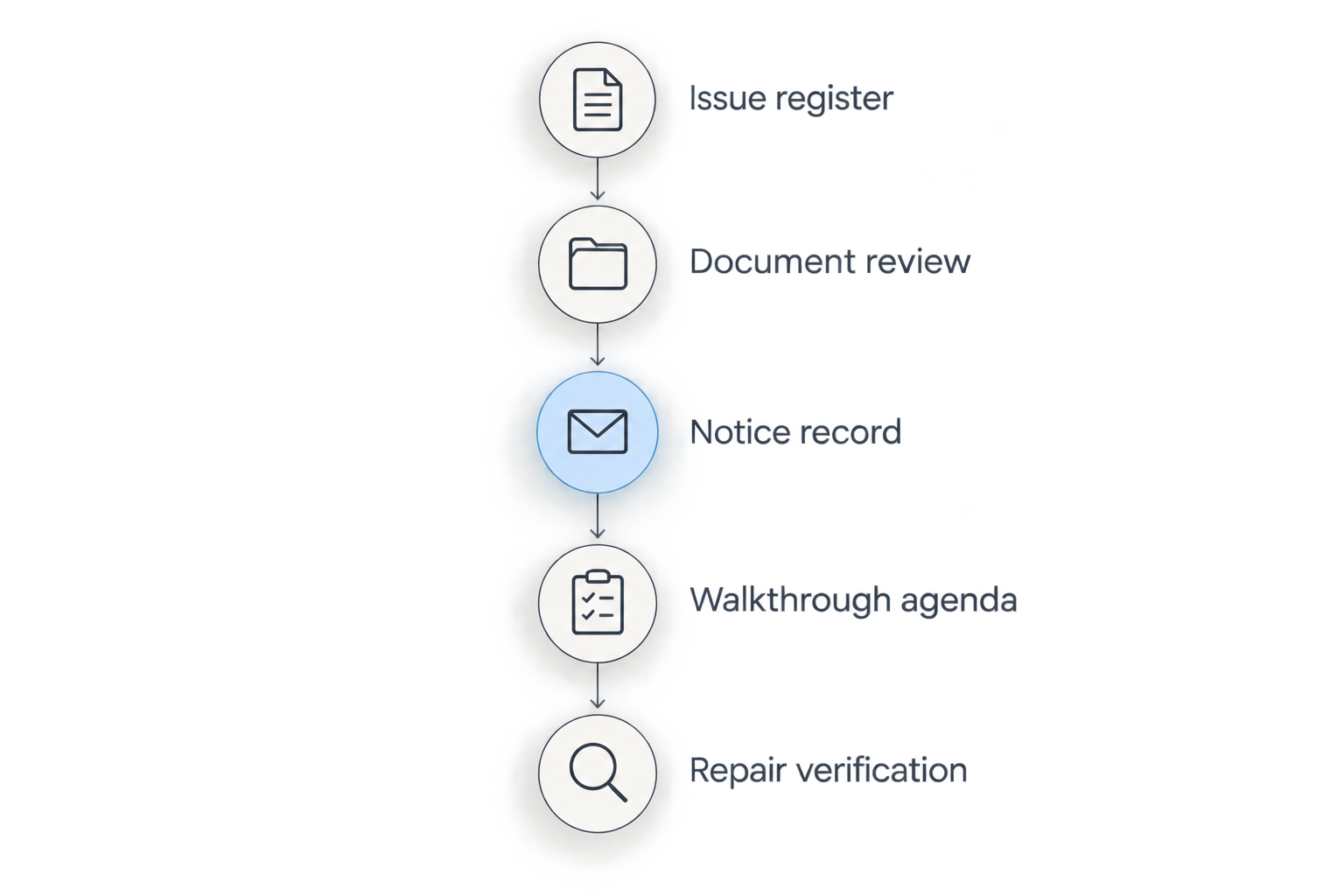
Issue register
Create the shared record
- Create one project folder and one master log. Name a person responsible for maintaining the record and controlling changes.
- Add Issue ID, Location, Description, Category, Date observed, Reported by, Assigned contact, and Status columns.
- Add Photo reference, Related document, Notice sent, Notice recipient, Target action date, Repair date, Verification date, and Verified by columns.
- Give each existing punch-list item a permanent identifier. Use a simple sequence, but never reuse an identifier after closing an item.
- Preserve a dated copy of the original punch list before adding later observations. For a 2026 closeout, retain that baseline separately from the working log.
Write observable conditions, not unsupported diagnoses. Instead of recording poor installation, describe the location and symptom: the bathroom door rubs the frame at the upper corner when closing. Let the responsible professional determine the cause.
As a documentation target, take 2 photos per issue: one showing the location and one showing the condition. Add more where useful, but do not open equipment or expose concealed work just to improve the record.
Expected result: every existing issue has a stable identifier, a precise location, supporting evidence, and an assigned contact. Someone unfamiliar with the project can find the condition without asking you to reconstruct the conversation.
Separate the review categories
Use the following categories in Category. They organize review; they do not decide contractual responsibility.
| Category | Best for | Benefit | Limitation |
|---|---|---|---|
| Open punch item | Work recorded before closeout that remains incomplete or unverified | Preserves the original obligation and history | Does not establish the contractual remedy by itself |
| New warranty report | A condition first reported after turnover | Separates later observations from unfinished work | Coverage still requires review of applicable documents |
| Maintenance review | A condition needing review against operating or care instructions | Keeps maintenance questions visible | Must not become an unsupported reason to reject a defect |
| Scope clarification | A disagreement about what the contract includes | Directs the question back to drawings and agreements | Requires document review before responsibility is resolved |
Do not move an unfinished punch item into the warranty category simply because occupancy began. Preserve its original classification and add the current review status.
Document and notice controls
Connect each issue to its governing documents
- Review the contract and applicable warranty documents with the designated project contact. Record the relevant provision or document reference without paraphrasing away conditions.
- Add Coverage review with values such as Pending review, Accepted for correction, Disputed, or Referred for evaluation. Keep this separate from repair progress.
- Record any applicable notice deadline and its source. If documents are unclear or conflict, seek clarification rather than entering an assumed deadline.
- Send required notices through the specified channel. Save the notice, attachments, and delivery evidence, then reference them in the issue row.
- Set a planning reminder before the documented deadline. A reminder 30 days before that date is an administrative choice, not an extension or a statement of legal requirements.
For your 2026 tracking sheet, keep Date observed, Notice sent, and Acknowledgment received distinct. An acknowledgment confirms receipt; it does not necessarily confirm coverage, responsibility, or a repair appointment.
Expected result: each issue has a traceable document reference and notice record. A scheduled meeting or an informal conversation is no longer standing in for required communication.
Keep regulatory closeout separate
A final inspection, permission to occupy, punch-list completion, and warranty review serve different purposes. Do not use one event as proof that every other obligation is complete.
For the regulatory handoff, review how to connect a final inspection to your certificate of occupancy. Keep those records in the project folder, but track their status separately from individual repair items.
Walkthrough preparation
Build the review agenda
- Filter the master log for open punch items, unresolved warranty reports, and repairs awaiting verification. Do not exclude an item merely because someone visited the site.
- Group the filtered items by room, floor, unit, or building area. Confirm access with occupants and the person authorized to admit contractors.
- Share the agenda and supporting photos before the appointment. Ask participants to identify records, specialists, or operating conditions needed for review.
- Reserve 15 minutes before the walkthrough to compare the agenda against recent reports. Treat this as preparation time, not a promised inspection duration.
- Walk the agreed route and update observations against the existing identifiers. Record disputed conditions neutrally and assign the next action rather than forcing an immediate conclusion.
For a 2026 property handoff, include the current owner or facilities contact on the agenda. If management changed, confirm who can authorize access and who receives formal notices; they are not necessarily the same person.
Ask for a defined action for each item: inspect further, provide a document, schedule an accepted correction, or explain a disputed position in writing. Avoid entries such as discussed or handled; neither tells the next reader what happens next.
Expected result: the walkthrough produces assigned actions and documented decisions, not a replacement list that loses the original history.
Repair verification
Close the loop without deleting evidence
- Set Status to Awaiting repair when an accepted correction is scheduled. Record access arrangements and any agreed protection or restoration requirements.
- After the contractor reports completion, change Status to Awaiting verification. Keep repair completion separate from owner verification.
- Review the original symptom against the completed work using safe, appropriate checks. Refer technical or concealed conditions to the responsible qualified professional.
- Attach after-repair photos and the repair description. Record who checked the condition, when, and any limits on what was observed.
- Close the item only after the designated reviewer records the result. Preserve unresolved disagreements rather than marking them complete for a cleaner report.
Expected result: a closed item explains what changed and how the result was checked. The log retains the original observation, notice history, repair record, and verification evidence.
A visual check is not proof of concealed performance. If a leak appears only under particular operating conditions, record those conditions and arrange an appropriate evaluation rather than declaring success from a dry surface alone.
When a repaired condition returns
A recurring problem needs its own observation date without losing the earlier repair history. This adjacent workflow uses the same register rather than creating an unrelated warranty spreadsheet.
- Locate the original issue and retain its photos, correspondence, and closure record.
- Create a linked recurrence entry or append a dated event under the original identifier. State which approach your team uses consistently.
- Record the new symptom, location, and conditions. Do not assume the cause matches the earlier problem.
- Review the applicable notice requirements again and send any required communication. Do not assume the earlier notice covers every later occurrence.
- Assign further evaluation and record the response separately from the original repair.
A repair does not automatically restart every warranty period. Check the applicable documents and law before changing dates in your register. For a recurring condition reported in 2026, preserve both the original timeline and the new observation date.
Troubleshooting
The owner and contractor have different lists
Compare both lists against the original dated baseline. Merge matching observations under one identifier, retain both descriptions where they differ, and circulate a dated reconciliation copy. Designate one master record for future updates.
An item is marked complete but still fails
Change the status to Awaiting verification or Reopened, as appropriate, and record the observed failure. Keep the prior repair entry intact. Request a next action and document the response instead of overwriting the history.
Nobody agrees who owns the correction
Keep responsibility Pending review and identify the contract provision, drawing, change document, or product record needing review. Assign a person to obtain the answer. An assigned coordinator is not automatically the party contractually responsible for the defect.
Access prevents inspection or repair
Record the attempted appointment, the access restriction, and the proposed alternative. Coordinate with the authorized occupant or manager and confirm arrangements in writing. Do not mark the underlying condition resolved because access was unavailable.
A condition presents an immediate hazard
Use the appropriate emergency response or qualified trade instead of waiting for the warranty appointment. Keep people away from the affected area, document conditions only when safe, and preserve notices and response records. Emergency action and coverage review are separate decisions.
Customize your workflow
For a home renovation, organize the log by room and finish or system. For a commercial property, add tenant space, facilities contact, and access restrictions. For a public-sector project, follow the contract's acceptance, reporting, and authorized-representative requirements rather than substituting an informal checklist.
Aandeconstructionllc offers general contracting across residential, commercial, and government construction. When requesting project-specific help, provide the site address, scope, relevant contract documents, existing issue log, photos, occupancy constraints, and target review schedule; confirm the proposed responsibilities before proceeding.
FAQ
What's the difference between a punch list and a warranty walkthrough?
A punch list records work needing completion or correction near closeout; a warranty walkthrough reviews reported conditions against applicable warranty documents. Keep their categories separate even when both use the same issue log.
How do I connect my punch list to a warranty walkthrough?
Use one master log with permanent issue identifiers, dated observations, photos, notice records, and repair verification. Carry unresolved punch items forward without relabeling them as new warranty claims.
Should I wait for the warranty walkthrough to report a problem?
Do not wait when the applicable documents require earlier notice. Report the condition through the required channel and retain delivery evidence; the meeting does not replace notice requirements.
Does moving in mean every punch-list item is accepted?
Do not treat occupancy alone as proof that every punch-list item is accepted. Review the contract and applicable requirements, and keep unresolved items documented separately from occupancy records.
Does a repair restart the construction warranty?
A repair does not automatically restart every warranty period. Check the applicable warranty, contract provisions, and law before changing any deadline in your tracking record.
Who should attend a construction warranty walkthrough?
Include the owner or authorized representative and the designated contractor contact. Arrange access and include relevant facilities personnel or qualified specialists when the reported conditions require their input.
What should I do if the contractor disputes an item?
Preserve the item, supporting evidence, notices, and written explanation of the disputed position. Follow the agreement's dispute process and obtain qualified legal advice when necessary rather than deleting the condition from the log.
One last thing
Keep a pending-review column beside the closed-item count. A short list is not evidence of a successful closeout if disputed conditions disappeared, notices went unsent, or repairs were never checked. Preserve the history; make the next action obvious.